

Profile Builder instructions
Eight tabs. Fill them in order, save as you go, publish when you're ready. Your profile then lives at one link you paste into every coach email you send.
A profile doesn't replace a strong email or a strong showcase. It's where both of them land.
A coach who just watched her play needs somewhere to go for the full picture. A coach who received her email needs a reason to keep reading. The profile is the same answer to both.
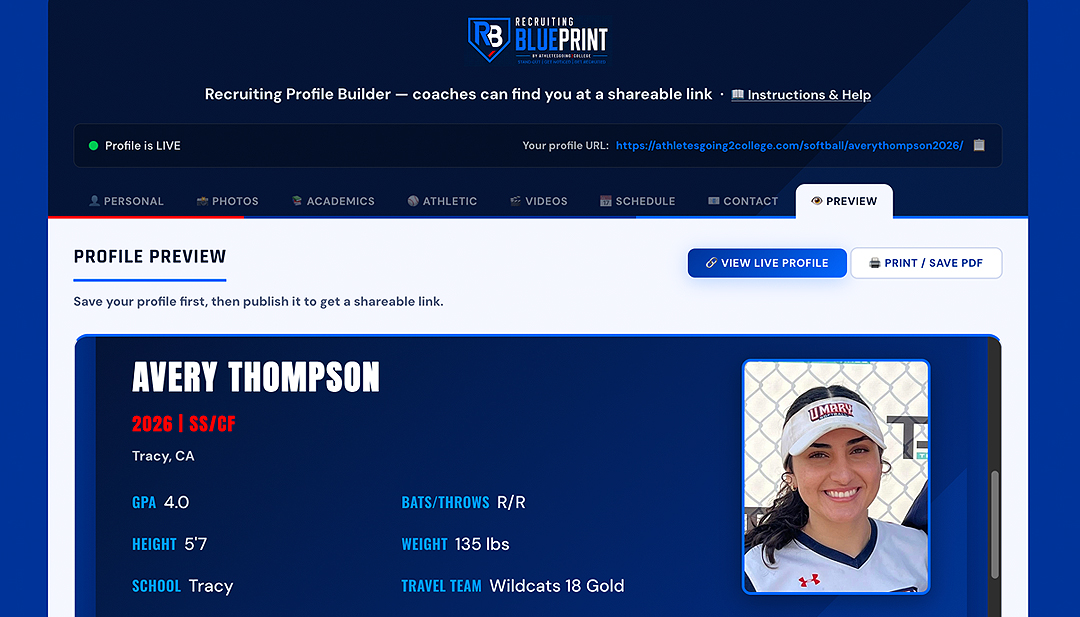
Once published it lives at its own URL — athletesgoing2college.com/softball/ followed by her name and graduation year — which doesn't change when you update it. A published profile looks like /softball/averythompson2026/.
The eight tabs
Work through them in order. Nothing is locked — you can save a draft at any point and come back.
Name, graduation year, position, height, weight, hometown, bats/throws — the header a coach sees first. Also holds your Personal Statement and your coach's Scouting Report, which are the two hardest fields in the builder and the two that separate profiles. Help with both below →
Cover banner, headshot, high school logo, and up to ten action photos. Use a wide action or team shot for the banner and a clean, well-lit headshot — not a casual selfie. Action photos should show her competing, not posed.
High school, GPA, SAT/ACT, intended major, honors, and NCAA Eligibility Center ID. If she hasn't registered, the link is on this tab — creating the free Profile Page account costs nothing; the certification account D1 and D2 require carries a fee of $110 domestic or $170 international. Which account she needs →
Two sections — High School and Travel Ball. Team name, season stats and awards for each. Attach the competition level to every stat, or a coach can't read it. What makes a number credible →
Up to four YouTube links, each titled, embedded on the profile. Upload to YouTube first, then paste. Check the privacy setting before you paste — a Private video shows a coach nothing. Upload settings → · What the video should contain →
Upcoming tournaments and showcases, one per line with date and location. One of the most valuable sections there is — an interested coach sees exactly where to watch her. A stale schedule is worse than an empty one, because it signals a profile nobody maintains.
Email and social links. Her email is never displayed publicly — coaches reach her through the profile's contact form, which forwards to her inbox. Add Instagram or Twitter/X only if they're professional; coaches look.
Exactly what a coach sees. Once published this shows a live preview, and the Print / Save PDF button generates a PDF to attach to emails or hand out at showcases.
Publishing a minor's email address on a public page is a real risk, and it's the reason we tell families to use a parent's address elsewhere. The builder removes that problem — a coach gets a form, she gets the message, and the address is never exposed.
The parent-contact advice still applies to outbound email and to anything published off-site. Recruiting safety →
The two fields that separate profiles
Every other field is a data lookup. These two take thought — which is exactly why most profiles leave them thin, and why filling them properly does more work than anything else in the builder.
In her voice, not a parent's. A coach can tell instantly, and a statement written by an adult undercuts the athlete it's meant to help.
What works: what she's working on right now and why · what she wants from a college program · what she's like as a teammate, shown rather than claimed · why she plays.
What doesn't: "hard-working team player with a passion for the game." Every profile says it, so it carries no information at all.
A useful test: could this sentence appear on any other athlete's profile? If yes, cut it and write the specific version.
A paragraph from her travel or high school coach. Far more credible than anything she writes about herself, and one of the few genuinely third-party things on a profile.
How to ask: ask directly, give a deadline, and make it easy — send her position, her target level, and two or three things she's improved this season so the coach has somewhere to start.
What to ask for: an honest evaluation rather than a recommendation. What she does well, where she projects, and what she's working on. A report that admits a weakness is more believable than one that doesn't — and coaches read a lot of these.
Ask early in a season, not in the week you want to publish. Coaches write better ones when they aren't rushed.
Saving, publishing and updating
At the bottom of every tab. Saves your work without publishing anything. Save often — a saved draft survives closing the browser.
Goes live immediately at its own URL. The status bar shows a green dot and your profile link once it's live.
Edit any tab and click Update. Changes are live immediately and the URL never changes — so a link you sent last year still works.
Takes the profile offline temporarily — changing programs, correcting a graduation year, or making big revisions. The public URL goes dark until you publish again.
Because updating never changes the link, every email she has ever sent keeps working. A coach who saved her profile in October and comes back in March sees the current version, not the one from October.
That's the argument for publishing when it's good rather than waiting for perfect — and for updating it rather than rebuilding it.
Two checks, both quick, both worth doing in order.
- Is every field filled? The complete inventory of what belongs on a profile — and which fields matter more than the effort they take. Content checklist →
- Can a coach actually evaluate her from it? Twelve items covering identity, academics, measurables and video. Any red item stops the process. Run the gate →
Then open the Preview tab and read it as a stranger would. It's the closest you'll get to seeing what a coach sees.
Put the profile to work
ATHLETESGOING2COLLEGE
STAND OUT | GET NOTICED | GET RECRUITED
The step-by-step college softball recruiting system — six stops from learning how recruiting works to signing with a program that fits. Your athlete runs it, under their own name.
Start the Blueprint — $199/yr →$24.99/month or $199/year · No contracts · Cancel anytime
Recruiting rules change and vary by division. Always confirm current rules with the governing body: NCAA.org · NAIA.org · NJCAA.org